Microsoft Purview Sensitivity Labels, Part 1: How to Get Started and Reach a Fully Labeled Environment

Sensitivity labels are one of those things that almost everyone agrees are important, but a lot of organizations still leave them half-done. Either nothing gets labeled because the project never really starts, or the first version becomes a giant taxonomy exercise where someone creates 27 labels, 14 sublabels, and enough policy settings to make everybody quietly hate the whole thing.
I think that is the wrong way to approach it.
The value of sensitivity labels is actually quite simple. You want your data to carry context with it. Is this public, internal, confidential, or something that really should not be floating around freely? Once that context exists, you can do useful things with it. You can guide users, apply encryption, drive DLP behavior, protect SharePoint content better, and get a lot closer to a world where sensitive content is not just sitting around unlabeled like an abandoned shopping cart in a parking lot.
This is also a good way to start a Purview POC along with data discovery. It is “easy” to create labels and educate users on how to use them and start familiarizing users to Purview.
This post is about how I would get started with sensitivity labels in Microsoft Purview, how I would improve them after the first rollout, and what I think a fully labeled environment actually means in real life.
I see this as Part 1 of a practical Microsoft Purview implementation series. I am starting with sensitivity labels because they are one of the clearest foundations for the rest of the Microsoft 365 data protection stack. If the planning work is still fuzzy, fix that first and then come back to the labels.
Skip to the good part
- Why sensitivity labels matter
- How I would start
- How to improve after the first rollout
- What a fully labeled environment actually looks like
- A practical maturity path
- Common mistakes
- Conclusion
Why sensitivity labels matter
When people talk about Purview, the conversation often drifts into licensing, compliance, AI, DLP, governance, or ten other things at once. Labels are one of the easier places to start because the problem is easy to understand and labels are also the basis for a lot of functionality in Purview.
Think of labels, not as tags, but as actual labels that travel with the item. Label also defines controls and requirements for the item later in the implementetion. You want content to be classified in a way that people and systems can both understand.
That matters for at least three reasons:
- Users need a simple way to understand how content should be handled. This is very important or labels will not be used or there will be a flood of default labels in the environment.
- Security controls like encryption, marking, DLP, and sharing restrictions become much more useful when they are driven by a label.
- AI, Copilots, search, and collaboration features all get a lot more dangerous when sensitive content is sitting around with no classification at all.
Microsoft’s guidance for getting started with sensitivity labels is also pretty clear on one important point: do not try to solve every scenario on day one. Start with the top one or two business needs, prove that the labels work, and then expand.
That is the bit I think many environments miss. The goal is not to build the most impressive label tree. The goal is to make it normal for important data to be labeled and protected in a way that people can actually live with. Start simple and usable, expand if needed later.
How I would start
If I was walking into a tenant from scratch, I would not begin from encryption settings, policy toggles, or some giant workshop where people debate the word “confidential” for three hours.
I would start with three questions:
- What are the first content types we actually care about?
- What is the smallest label set that still makes sense?
- Which protections do we really need at the beginning, and which ones can wait?
In many environments, a sensible first version is still something close to this:
- Public
- Internal
- Confidential
- Highly Confidential
That is not magical and it will not fit every organization perfectly, but it is already enough to get people moving. What usually matters more than the exact names is that the labels have clear meaning, clear user guidance, and sane policy behavior behind them.
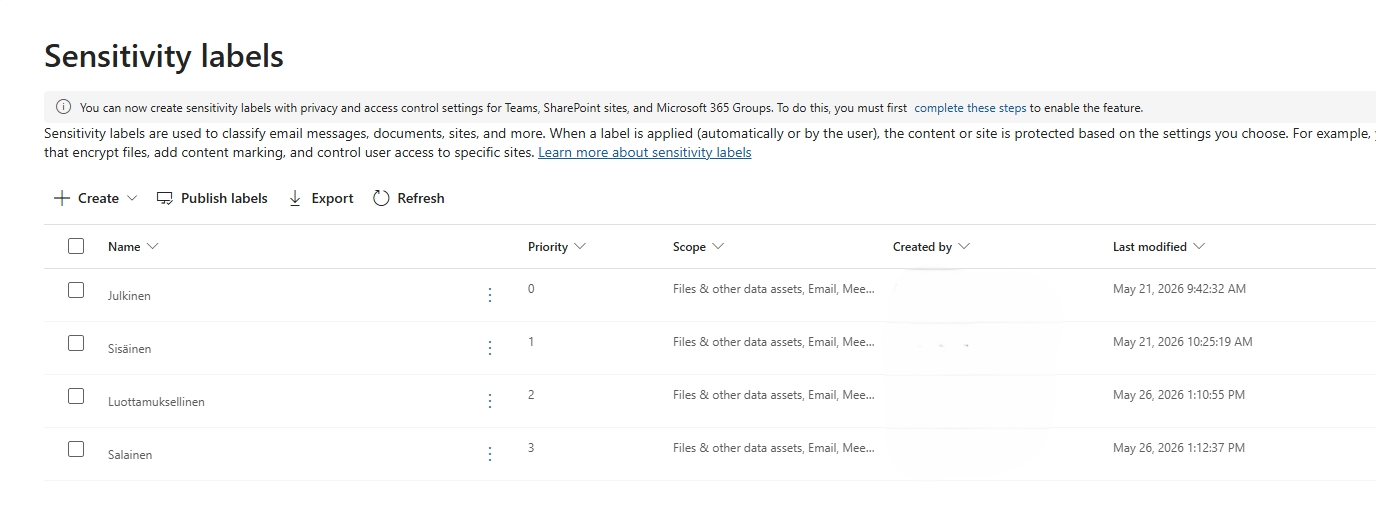
Above images labels are in Finnish but they are the same as above english labels.
At this stage I would also decide very carefully what each label actually does.
For example:
- Maybe
Internalis just a visual marker with no encryption. - Maybe
Confidentialadds protection or sharing restrictions. - Maybe
Highly Confidentialapplies stricter encryption and narrower access.
This is where it is easy to overdo things. Not every label should encrypt content. Microsoft specifically notes in the sensitivity labels guidance that default labels with encryption can create sharing pain if you have external collaboration and unsupported apps in the mix. That is one of those things that sounds obvious after you hit it, but it is still worth saying out loud before rollout.
The other practical thing I would do early is make sure the prerequisites are actually in place. If you want labels to work properly with SharePoint and OneDrive files, that support needs to be enabled in the tenant. It is also a prerequisite for some auto-labeling scenarios in SharePoint and OneDrive. Microsoft covers that in the SharePoint and OneDrive sensitivity label guidance. Something that also should be verified is that old Azure Information Protection labels are not applied to workstations. You have to get Built-In labeling to Office clients for Sensitivity Labels to work and that does not happen without legacy labeling enforcement dismantle.
After that, I would publish the labels to a pilot group first. Not the whole company. Not every department. A pilot group.
That pilot should include:
- people who actually create sensitive content
- someone from IT or security
- at least one person who is willing to complain honestly when the labels are annoying
That last person is very important. They are doing quality assurance whether they know it or not.
How to improve after the first rollout
The first rollout should not try to solve everything. It should give you enough structure to learn where the friction is.
Once the first version is live, I would focus on improving labels in five ways.
1. Clean up the meanings
This sounds boring but it matters a lot.
If users cannot quickly answer the question “when do I use Confidential instead of Highly Confidential?” then the model is not ready. Label descriptions, tooltips, user guidance, and internal examples all matter. Ambiguity is what creates inconsistent labeling. There also should be a policy that guides data labeling and classification as everything in cybersecurity. You need shareholders to approve the plan before executing.
I would much rather have four labels people understand than ten labels nobody trusts.
2. Add default labels where they make sense
There are a couple of useful ways to improve coverage without instantly jumping to full enforcement.
One is a default label in policy. Another is a default label for a SharePoint document library. These are not the same thing, and Microsoft makes that distinction pretty clearly in the default label guidance for SharePoint libraries.
That difference matters:
- A policy default label gives you a baseline for unlabeled content.
- A document library default label helps you push the right classification into a specific location.
If you have a finance library or a HR library, a location-based default can be a very practical step toward better consistency.
3. Move from manual-only to recommended and automatic labeling
Manual labeling is a fine starting point, but it is not enough if the goal is broad coverage.
At some point, you want the platform to help more actively. Microsoft supports both user-facing label recommendations in Office apps and service-side auto-labeling for locations like SharePoint, OneDrive, and Exchange. That is where you start getting real scale.
The important part is not just turning on auto-labeling. The important part is using it like an adult.
That means:
- start with a narrow scenario
- use conditions that are actually meaningful
- run simulation before broad enforcement
- review the results before turning policies fully on
Microsoft’s auto-labeling documentation is pretty explicit here. Simulation mode exists for a reason. Use it.
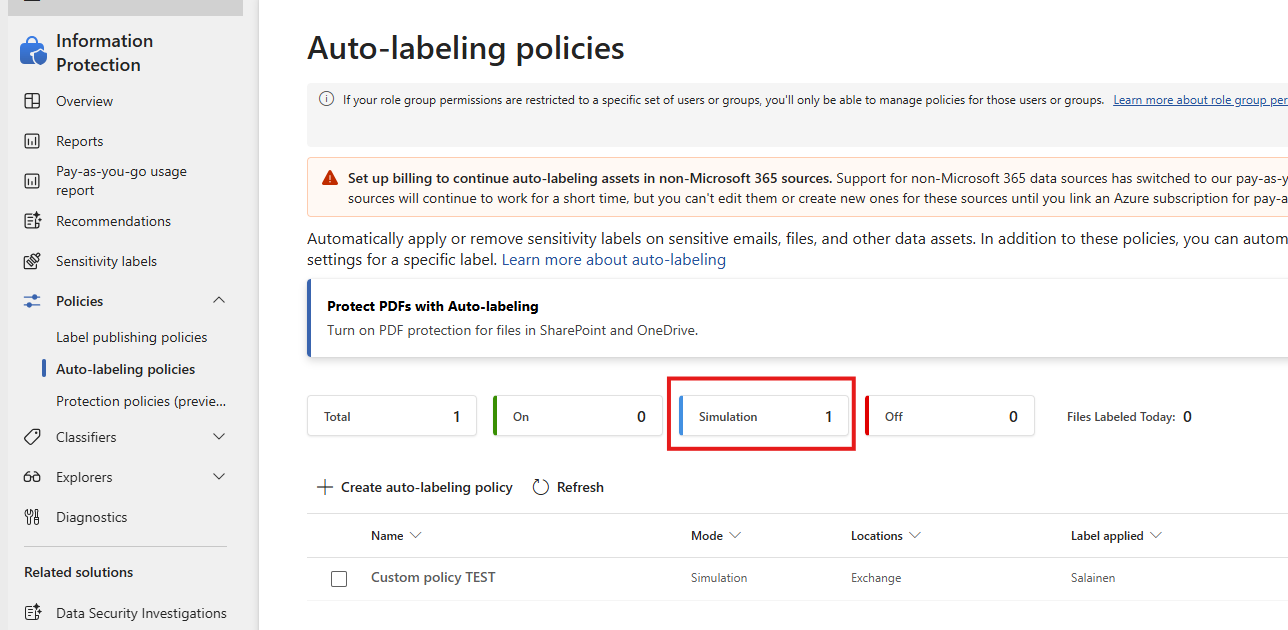
4. Turn on mandatory labeling only when the basics are in place
I like mandatory labeling, but only after the environment has earned it.
If your labels are unclear, your user guidance is weak, and your defaults are still messy, mandatory labeling just turns the problem into a help desk generator.
Once the taxonomy is clean enough and the pilot feedback is decent, then yes, requiring users to apply a label for documents and emails can make a lot of sense. Microsoft supports mandatory labeling and also lets you require justification when someone downgrades or removes a label. That is a very useful control because it adds a bit of friction exactly where it should.
5. Expand your reach beyond the obvious files
This is usually where the environment starts to become interesting.
Once the Microsoft 365 core is in a better place, you can extend your thinking to:
- SharePoint and OneDrive at scale
- Exchange and email flows
- Teams-related content where labels matter
- PDFs if that support is relevant in your tenant
- on-premises or legacy file stores if you still have them
Microsoft also documents some of these reach-expanding options in the auto-labeling guidance, such as using default labels for libraries, auto-labeling at rest, and the scanner for some on-premises scenarios.
What a fully labeled environment actually looks like
I do not think a fully labeled environment means that literally every single file in existence is perfectly labeled forever. That sounds nice in PowerPoint and less nice in the real world.
What I think it really means is this: unlabeled content becomes the exception instead of the default.
In a healthy environment, you should be able to say most of the following are true:
- New documents usually get a label by default or through user action.
- Sensitive content gets recommended or automatic labels with decent accuracy.
- Important SharePoint locations do not stay unlabeled just because users forgot.
- Users understand what the labels mean.
- Downgrading labels creates enough friction to be visible and intentional.
- Reports and operational review show you where labeling coverage is weak.
That is what “fully labeled” looks like to me. Not perfection. Coverage.
It also means you stop treating labels as a compliance checkbox and start using them as a control plane for the data itself.
If the environment is still mostly relying on “please remember to click the right label every time”, then it is not fully labeled. It is just optimistic.
A practical maturity path
If I had to compress this into a maturity path, it would look something like this:
Phase 1: Get the labels live
- create a small, understandable label taxonomy
- publish to a pilot group
- train users with real examples
- validate that the labels behave correctly in Office apps and collaboration flows
Phase 2: Build a baseline
- add default labeling where it makes sense
- make sure SharePoint and OneDrive support is enabled
- clean up label priority and policy targeting
- improve user guidance based on real mistakes
Phase 3: Improve coverage
- add recommended labeling for common cases
- introduce service-side auto-labeling in simulation mode
- review results and adjust conditions
- expand to more workloads and more business units
Phase 4: Enforce more confidently
- turn on mandatory labeling where users are ready for it
- require justification for downgrades where appropriate
- use location-based defaults for sensitive libraries
- make unlabeled content something you actively chase down
Phase 5: Treat labeling as ongoing operations
- review reports regularly
- retire labels that are not helping
- improve labels when new business processes appear
- connect labeling more tightly with DLP, retention, and broader Purview controls
Placeholder visual: Diagram of sensitivity label maturity moving from manual labeling to default labeling, recommended or auto-labeling, mandatory labeling, and operational review. Purpose: Give readers a roadmap for improving coverage instead of treating labels like a one-time project.
Common mistakes
I think most sensitivity label projects run into the same traps.
Purview implementation gets treated as a technical project
It´s really not. You should prepare by creating policies for information governance and closely work with legal and HR to create a basis for all of the technical things later.
Not cleaning up legacy
Purview portal is not the most reactive of Microsoft´s admin portals. This makes troubleshooting difficult as it takes time, on top of the change propagation time of at least 24h. You should prepare the environment if you do not want to lose your interest before the project even fully starts.
Clean up the old labels used by Azure Infromation Protection.
Too many labels too early
This is probably the classic one. If the first version already needs a legend, it is too big.
Encryption everywhere
Protection matters, but blanket encryption can create usability pain, external sharing issues, and application compatibility surprises.
No user training
Labels are not just a technical feature. They are a user behavior feature as well. If users do not know the difference between the labels, the coverage numbers might still improve while the accuracy quietly falls apart.
Mandatory labeling before the environment is ready
This is a good way to make people hate the project before it has a chance to help them.
Treating the first rollout as the final state
It is not.
The first rollout should give you a stable baseline. The real value comes from improving the model, expanding coverage, and using the platform features that reduce dependence on perfect user behavior.
Conclusion
Sensitivity labels are one of the best starting points in Purview because they are practical, visible, and connected to a lot of other controls. They help users make better choices, they help admins apply better protections, and they create a path toward a cleaner data security model.
I think the key is to start smaller than your instincts might tell you, then mature the environment on purpose. Get the first labels out, validate that people understand them, improve the defaults, add recommended and automatic labeling, and only then lean harder into mandatory coverage.
That is how you get closer to a fully labeled environment without turning the whole thing into a painful compliance theater exercise.
If you are still trying to get your head around Purview more broadly, start with my earlier post Microsoft Purview: What Is It and Why Do I Need It?. It gives the wider context for why labels matter in the first place.
If you want the implementation path before labels, start with the pre-implementation post in this series. The next logical step after labels is DLP, because that is where classification starts turning into enforcement.