Microsoft Purview: What Is It and Why Do I Need It?

I have a long list of topics that I want to write about and Purview has been on that list for a while. It is one of those Microsoft products that gets mentioned a lot, appears in licensing discussions, shows up in AI security conversations, and somehow still manages to feel a bit fuzzy when you try to explain what it actually is.
I think that is the first problem with Purview. Most people do not struggle with whether data security matters. They struggle with understanding where Purview starts, where it ends, and why half of the discussion around it seems to be about licensing, governance, compliance, or all three at the same time.
If you are in the same boat, this post is the first one in my Purview series and the purpose is simple: explain what Purview actually is, how I think the platform is split, and why it matters a lot more now that AI tools, Copilots, and different application integrations keep touching more and more business data.
Skip to the good part
- Why Purview even exists
- Why the product feels confusing
- How I think about the platform
- Where I would start in a test tenant
- What I think matters most right now
- Conclusion
Microsoft has started positioning Purview as a unified platform for data security, compliance, and governance in the era of AI. Microsoft documentation says that Purview helps organizations govern, protect, and manage data wherever it lives. That sounds nice but in real life what it usually means is this: your data is spread all over Microsoft 365, SaaS apps, endpoints, AI prompts, mailboxes, Teams chats and random locations people forgot even existed. Purview is Microsoft’s answer to that mess.
Why Purview even exists
The reason Purview exists is actually quite simple. Traditional security thinking has focused a lot on users, endpoints, identities, and network boundaries. All of that still matters, off course, but the data itself has become the bigger problem. If sensitive data is overshared, unlabeled, copied to the wrong place, dropped into an AI prompt, or hanging around in old locations nobody is monitoring, then having a strong identity stack alone is not enough.
That is why I think Purview matters. It is supposed to help you understand what data you have, where it is, how sensitive it is, who is using it, and what controls should follow it. That puts it in a different place than products that focus more directly on endpoint detection or identity governance. It also means Purview gets pulled into a lot of discussions now that organizations want to use AI without leaking the whole kingdom to the first overly curious prompt.
This is also why Purview connects quite naturally with topics I have already written about, like Defender for Cloud AI Posture Management & AI Workload Protection and Unified Security Posture Management. One protects workloads and posture, the other tries to unify visibility, and Purview comes into the picture when the question becomes: what about the data itself?
Why the product feels confusing
I think Purview feels confusing for three reasons.
First, it covers several different problem areas at once. Microsoft documentation on data security, compliance, and governance splits the discussion into those three buckets, and that is already a hint that this is not one neat product with one neat purpose.
Second, Purview overlaps with other Microsoft products just enough to make people unsure where to look first. Defender talks about risk, exposure, and incidents. Entra talks about access and identity. Microsoft 365 talks about collaboration and productivity. Purview then shows up and says it handles labels, DLP, retention, eDiscovery, insider risk, governance, audit, AI protections, and more. At that point the normal reaction is not excitement. It is usually “okay, so what do I actually need from all of this?”
Third, licensing gets messy quickly. I have Business Premium in my own test tenant and I noticed very fast that Purview is not just a yes-or-no product. You get some functionality, then more with add-ons, more with E3, then more with E5 level licensing, and then some governance or browser-related scenarios still want Azure billing or other dependencies on top. I´ll probably do a separate post about licensing because that rabbit hole deserves its own flashlight.
How I think about the platform
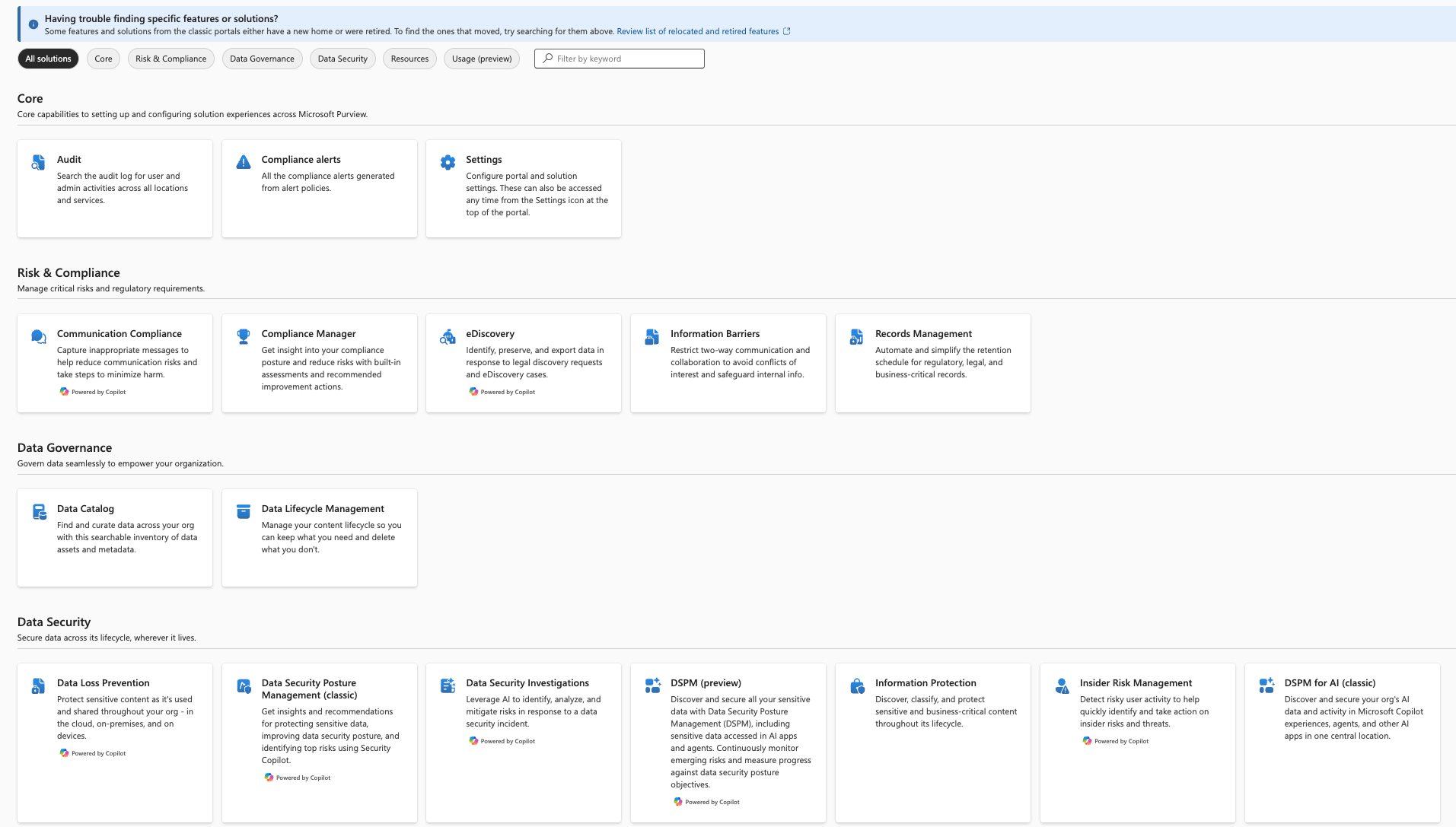
The easiest way I have found to think about Purview is not by memorizing every portal blade. I think about it in three main buckets.
1. Data security
This is the part most security people will recognize first. Labels, encryption, DLP, insider risk, and newer data security posture management capabilities all sit near this conversation. The point is to identify sensitive data, classify it, protect it, and notice when people are doing something they probably should not be doing with it.
2. Data compliance
This is where audit, eDiscovery, lifecycle management, records, and policy-driven retention start to matter more. Some of these features sound boring right until the day you actually need them. Then they suddenly become very interesting.
3. Data governance
This is the side that many security-focused people know less about. Microsoft data governance documentation explains this through Data Map and Unified Catalog. Here the focus is less about blocking bad things and more about visibility, trust, ownership, lineage, quality, and making data usable without turning it into chaos.
That is also why Purview is not just a compliance product and not just a security product. It sits awkwardly in the middle of several important things, which is probably why it can feel a bit like Microsoft built three discussions and put them behind one name.
Where I would start in a test tenant
If I was starting from zero in a test tenant today, I would not try to turn on every Purview capability at once. That is a very efficient way to get confused and then annoyed.
I would start with these questions:
- Can I create and publish sensitivity labels?
- Can I see where sensitive content lives?
- Can I build one simple DLP policy and verify how it behaves?
- Can I understand what my current licensing actually gives me before I start clicking deeper into features I do not yet have?
Minimal licensing setup that gets pretty much all of the features is M365 Business Premium + Purview Suite combo. At least that is what I´m using in my test tenant. Free options to try things out limits out to trial that can be activated from Purview portal.
I also think it is worth checking the portal structure early. Microsoft’s Purview portal guidance makes it clear that Microsoft wants this to feel like one unified place for data security, compliance, and governance. Whether it feels unified on day one is another discussion, but that is the intended direction.
What I think matters most right now
The reason I wanted this post to come first in the series is that Purview becomes much easier to understand once you stop asking “which button does what?” and start asking “what problem am I actually trying to solve?”
Right now I think the biggest practical driver is AI. Not because AI magically changed every security principle we know, but because it increased the speed and blast radius of bad data practices. If data is overshared, badly labeled, poorly governed, or sitting in places where nobody understands the permissions, AI tends to make that more visible and more dangerous.
That is why Purview matters even before you become a Purview expert. You do not need to master the entire platform on day one to understand the basic point: if you want to use AI safely, you need to understand your data better than many organizations currently do.
This also connects quite naturally with Securing Azure Identities. Strong identity controls are still critical, but identities alone do not solve data sprawl, oversharing, or compliance headaches. You need both.
Conclusion
Microsoft Purview is not a small feature and it is definitely not the kind of product you understand by reading one marketing paragraph and moving on. It sits between data security, compliance, governance, and now increasingly AI controls as well. That is also exactly why it matters.
For me, the most useful way to look at Purview is as the part of Microsoft’s ecosystem that tries to make sense of the data problem itself. Not just the identities around it, not just the workloads around it, and not just the incidents after something has already gone wrong.
I think the product is still a bit messy to explain, and licensing does not exactly make the first impression cleaner, but the core idea is solid. The more data moves across Copilots, SaaS apps, and collaboration tools, the more important it becomes to know what that data is, where it lives, and what should happen to it.
I´ll continue this series with the more specific Purview areas next, because this post is intentionally high level. The next logical step is the data security angle in the era of AI, and after that I want to go deeper into labels, DLP, and the parts that are actually possible to test without needing a microscope and a licensing spreadsheet. It´s also important to note that legislation might provide it´s own hurdles to the implementation of compliance solutions in each country. I´ll be doing a post about Finnish legislation and thinking through how it affects Purview usage here.
Remember to check my other posts as well. If you want the AI security angle first, start with Defender for Cloud: AI Posture Management & AI Workload Protection. If you want the wider Microsoft security direction, Unified Security Posture Management is also worth a read.