Microsoft Purview Retention, Part 3: How to Build Lifecycle and Records Controls
Retention is one of those Microsoft Purview topics that gets less attention than labels or DLP until the day someone asks how long a document should exist, whether it can be deleted, or whether legal needs it preserved. I also feel like a lot of organizations are in a sort of hoarder mode and they just keep everything for the end of time. This does not only make things incredibly difficult to find but in todays world is also illegal since GDPR enforces for only storing personal data for specific purpose. Once that purpose is done, the data should be anonymized or deleted.
This is also kinda the starting point from which many converstations start the interest towards Purview. “We have a ton of files in SharePoint and no one knows are they used or should they be deleted”.
This post is Part 3 of my practical Microsoft Purview implementation series. By this point, I am assuming the groundwork is in place, labels exist or are on the way, and DLP is no longer just a future slide in somebody’s PowerPoint. If they are not, check my previous posts about Labels or DLP. The next question is lifecycle: what needs to be kept, what should be deleted, and what has to be treated as a record.
Skip to the good part
- Why retention is not the same as sensitivity
- Retention policies versus retention labels
- Where records management fits
- How I would start
- Who needs to own the decisions
- Common mistakes
- Conclusion
Why retention is not the same as sensitivity
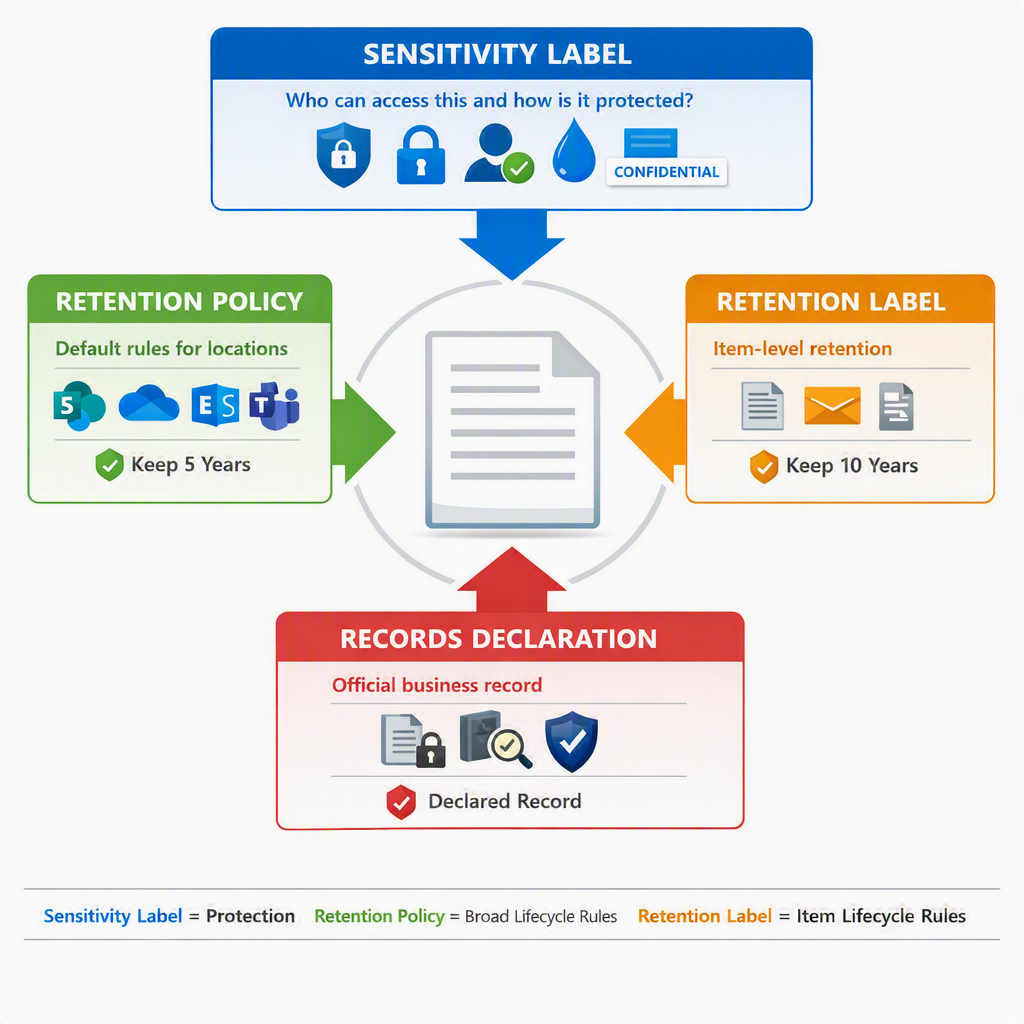
Sensitivity is about how content should be protected. Retention is about how long content should be kept and what should happen at the end of that period.
Those things absolutely relate to each other, but they are not interchangeable.
Microsoft’s retention guidance makes that distinction clear. Retention policies and retention labels enforce retention and deletion settings, while records management adds stricter controls for business-critical or regulated content. Learn about retention policies and retention labels and Learn about records management are worth reading side by side because they stop the terminology from turning into soup.
The practical version is simple:
- a sensitivity label can say this file is confidential
- a retention label can say keep this file for seven years
- a record setting can say this item cannot be casually changed or deleted once declared
If you try to solve all three with one taxonomy workshop, the project usually gets slower and the users get less clarity.
Retention policies versus retention labels
Microsoft gives you two main building blocks here, and I think it helps to keep them mentally separate from the start.
Retention policies are better when you want baseline lifecycle control across locations or workloads. Retention labels are better when you need item-level control for specific classes of documents or emails. Learn about retention policies and retention labels lays out the differences quite clearly.
I usually think about them like this:
- retention policies are broad governance
- retention labels are precise governance
That distinction matters because the implementation approach is different.
If the business needs a tenant-wide or workload-wide baseline, start with policy thinking.
If the business needs different lifecycle behavior for contracts, HR records, board materials, or controlled engineering documents, labels start making more sense.
Microsoft also notes an important behavioral difference: sensitivity labels can stay with content when it moves, but retention labels do not persist outside Microsoft 365. That is another reason not to mix the two concepts together as if they were interchangeable. Learn about retention policies and retention labels states that plainly.
Where records management fits
Records management is the part that makes lifecycle feel serious.
Microsoft describes records management as the solution for legal, business, and regulatory records, using retention labels to mark items as records, manage disposition, and support the full lifecycle of content. Get started with records management is a good starting point because it walks through the basic shape of the solution.
I think the important point is this: not every retained item needs to become a record, but some content absolutely should.
Typical examples might be:
- signed agreements
- formal HR records
- regulated reports
- policy documents with required retention and controlled deletion
This is also where file plans, event-based retention, disposition review, and record declaration start to matter. If your organization has real retention schedules already, Microsoft gives you ways to bring that structure into Purview instead of improvising it from scratch. Learn about records management and Use file plan to create and manage retention labels are the relevant anchors there.
How I would start
I would not start by clicking through the portal and creating labels named Seven Years and Permanent like I am sorting leftovers.
I would start with five questions:
- what content classes actually need lifecycle control first
- For example in Finland, it´s legally reguired to keep financial documents for 10 + current years.
- what existing retention schedule already exists outside Microsoft Purview
- Think Exchange MRM Retention Policies.
- which teams own the business decisions
- And who owns the data.
- where baseline retention is enough and where item-level labels are needed
- which items need to be declared as records
After that, I would usually build in this order:
- baseline retention policies for broad coverage where the requirement is simple
- retention labels for the high-value document or email classes
- records declaration only where the legal, regulatory, or business need justifies the extra restriction
- auto-application or defaulting only after the logic is trustworthy
Microsoft’s guidance for records management also reinforces that retention labels are reusable building blocks and that publishing them is a separate step from creating them. Publish retention labels and apply them in apps is useful precisely because it forces that separation.
Who needs to own the decisions
Retention is not an admin-only conversation. It is one of the clearest places where legal, records, compliance, and business ownership need to show up before implementation.
At minimum, I would want these owners involved:
- legal or compliance for defensibility and regulatory requirements
- records or information governance if that function exists
- business owners for the content classes that actually matter
- Microsoft 365 owners for workload behavior and feasibility
- security only where lifecycle decisions clearly affect protection, investigations, or risk
The reason I call that out is simple: the hardest retention failures are not technical. They are ownership failures.
If nobody can explain why content is being retained for six years instead of ten, then the portal setting is the least interesting part of the problem.
Common mistakes
I think most first-wave retention projects stumble in familiar ways.
Treating retention like a copy of sensitivity labeling
It is not. Protection and lifecycle solve different problems.
No file plan or schedule behind the configuration
If the portal settings have no policy or records basis behind them, the rollout is not mature. It is guesswork.
Declaring too much content as a record
Records restrictions are useful, but they are not free. Apply them where the requirement is real.
Publishing labels before the ownership model is ready
That is a fast way to get stuck between admins, legal, and business teams with nobody sure who decides what.
Forgetting disposition and review
Retention is not only about keeping data. It is also about deleting data when the retention purpose ends.
Conclusion
Once labels and DLP are in place, lifecycle becomes the next serious question. Microsoft Purview gives you the tools for retention, records declaration, and disposition, but the quality of the rollout still depends on whether the organization knows what it is trying to keep, why it is keeping it, and when it should let go.
I would start smaller than most organizations want, keep the ownership model explicit, and separate baseline retention from high-value records use cases. That tends to produce a system people can actually defend later. Records management side of Purview is a whole beast on it´s own and this post is just to get you going. One can make whole careers out of records management so this is not that deep on purpose.
If you want the broader context, start with my earlier post Microsoft Purview: What Is It and Why Do I Need It?. If you are reading this series in order, the previous step is DLP. The next step is operations, because once controls exist, someone has to review whether they are actually doing what you thought they would.