Microsoft Purview Operations, Part 4: How to Monitor, Review, and Improve
There is a point in every Microsoft Purview rollout where the project team acts like the work is mostly done because the labels are published, the DLP policies exist, and the retention settings are no longer only in workshop notes. Haha!
This is the point where the real work starts. (I think I´ve said this in a previous post as well but you know what I mean.)
This post is Part 4 of my practical Microsoft Purview implementation series. At this stage I am assuming the core controls exist in some form. The next job is operations: can you see what is happening, can you tell whether the controls are working, and can you improve them without waiting for a major incident to do the prioritization for you.
This post is also written from a general point of view. Legislation might limit people in certain countries like mine (Finland) and there needs to be a real case to go and watch Activity Explorer or Content Explorer as it will reveal personnel data and interactions on a level that is not good to just go looking through. A good practice in any country but still, a disclamer for you.
Skip to the good part
- Why rollout is the beginning, not the end
- What Activity Explorer is actually good for
- What Content Explorer and Data Explorer tell you
- Why audit still matters
- What I would review regularly
- Common mistakes
- Conclusion
Why rollout is the beginning, not the end
Purview controls are only useful if somebody checks whether they are doing what the organization intended. That sounds obvious, but it gets missed constantly.
Labels can be published and still be misunderstood. DLP can be enabled and still be noisy. Retention can be configured and still not line up with actual business practice. That is why the operating loop matters. DLP policy updates should be treated as detection engineering process as they are continuously evolving and needs change.
For me, that loop usually comes down to a few simple questions:
- what is being labeled & what is not?
- what is being downgraded or removed & why?
- what is being blocked or overridden & also why?
- where sensitive data is concentrated
- where the control model still has obvious gaps
Information Protection also provides some general reports that give you an idea about the usage as well as a possible good enough reason to dig deeper. You might notice for example that one particular label gets applies more than others and you can then look for reasons elsewhere.
Microsoft gives you several places to answer those questions, and Activity Explorer is one of the most useful starting points.
What Activity Explorer is actually good for
Microsoft describes Activity Explorer as a historical view of what is being done with labeled content, pulling from unified audit logs and surfacing up to 30 days of data in the UI. Get started with Activity Explorer is the key reference here.
That scope matters because Activity Explorer is not just a dashboard for admiration. It is operational evidence.
It can help you answer questions like:
- where labels are being applied, changed, downgraded, or removed
- where DLP policies are matching activity
- where labeled content is being read, moved, or handled in unexpected ways
- whether a control is technically working but behaviorally failing
I think it becomes especially useful after rollout because it helps you separate three different problems:
- bad policy logic
- bad user understanding
- bad underlying permissions or sharing practices
Those are not the same problem, and Activity Explorer helps you stop pretending they are.
What Content Explorer and Data Explorer tell you
Activity tells you what people are doing. Content Explorer is more about where sensitive information currently lives. Microsoft uses Content Explorer as part of data classification analytics to help admins understand where sensitive data is stored. That makes it useful when you want a location-oriented view rather than just an activity-oriented one.
I think the operational value is straightforward:
- Content Explorer helps you understand where sensitive data is concentrated.
- Data Explorer helps you go deeper when you need to inspect specific patterns or locations more closely.
- Together they help you decide whether your label coverage and DLP scope reflect reality or only the rollout plan.
That is often the point where teams discover that sensitive data has a very strong opinion about living somewhere nobody designed for.
Why audit still matters
Activity Explorer is useful, but it is not the whole story. Audit is still the broader investigation and evidence layer.
Microsoft Purview Audit remains the place for wider forensic, compliance, and legal review, and Microsoft documents that Audit Standard is the base layer while Audit Premium adds richer investigation capabilities and longer retention options depending on licensing and policy. Learn about auditing solutions in Microsoft Purview is the main anchor for that.
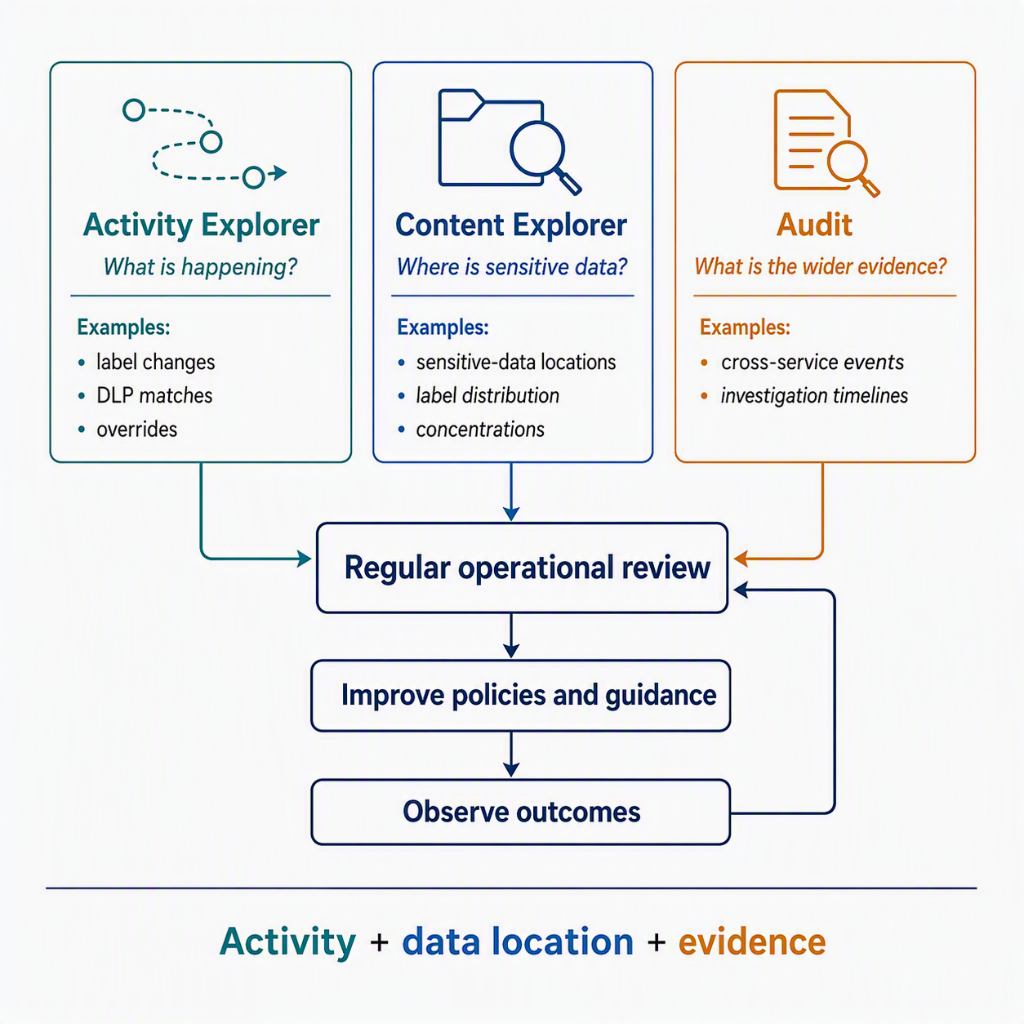
I think the practical split looks like this:
- Activity Explorer for day-to-day information protection and DLP operations
- Audit for cross-service investigation, evidence, and deeper timelines
If you only use one of those, you usually end up either too shallow or too slow.
Just to clarify, eDiscovery is related to these but serve a different purpose. It´s also a tool to look for audit and activity data but in a formal way. I won´t go into it here but might write anoter post about it later.
What I would review regularly
I would keep the review cadence smaller and more boring than most organizations expect. That is a compliment.
At a minimum, I would want recurring review of:
- label distribution and obvious coverage gaps
- label downgrade and removal patterns
- top DLP rule matches and the users or locations driving them (at minimum, this should be a part of SOC processes)
- high-friction policy tips and overrides
- new concentrations of sensitive data in unexpected locations
- audit signals that suggest the control model is being worked around
I would also want clear ownership for those reviews.
Usually that means:
- security or compliance owns the control health view
- Microsoft 365 platform owners own the service behavior view
- business or content owners get involved when patterns point to real workflow problems
That last point is important. Not every strange metric is a security story. Sometimes it is just evidence that the business process was never designed with the control in mind.
Common mistakes
I think Purview operations usually go wrong in a few reliable ways.
Treating dashboards as success by themselves
A dashboard is not an outcome. It is a question generator.
No review cadence
If nobody has a calendar entry for control review, the platform is drifting whether people admit it or not.
Looking only at noisy incidents
The quieter trends matter too. Slow growth in downgrades, strange storage patterns, or repeated minor overrides can be more useful than one dramatic alert.
No business feedback loop
If operations never reconnect with the people doing the work, policy tuning turns into guesswork again.
Forgetting licensing and data windows
Some analytics and audit depth depend on the licensing model. That is not exciting, but it absolutely affects what you can see and how far back you can see it.
Thinking that Purview functionality is a project
The classic at the end. The functionality that Purview and it´s components provide are possibly taken into use as a project but having them as operational tools and integrated parts of the IT/Cybersecurity function demands processes to go with them.
Conclusion
Microsoft Purview only becomes operationally useful when someone keeps checking whether the controls are working in the real environment instead of the design deck.
For me, the practical combination is clear enough: use Activity Explorer to understand behavior, use Content Explorer and related classification views to understand data concentration, use Audit for wider investigation, and run a review cadence that actually changes policy and guidance when the data says it should.
If you want the broader context, start with my earlier post Microsoft Purview: What Is It and Why Do I Need It?. If you are following this series in order, the previous step is retention. The next step is investigations and Insider Risk, because operational visibility is what tells you when a control issue has become a case issue.